Node for IP Based & KVM System - AVCIT DSX-ONE
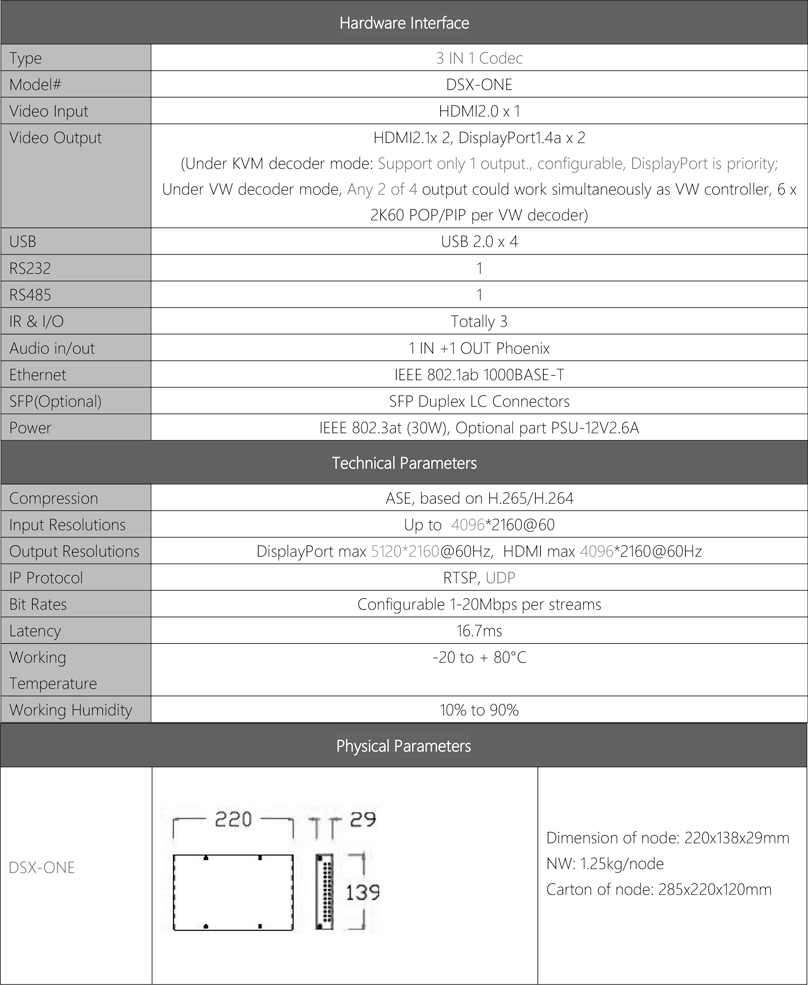
AVCIT DSX-ONE is 3 IN 1 Codec(Patented AVCiT-Screen-Encoder/Decoder) , with build-in 3 functions: the KVM encoder, KVM decoder and 2-channel video wall controller in one compact body, which could be switched by service technician, and provide more flexibility for system design, installation and onsite-service;
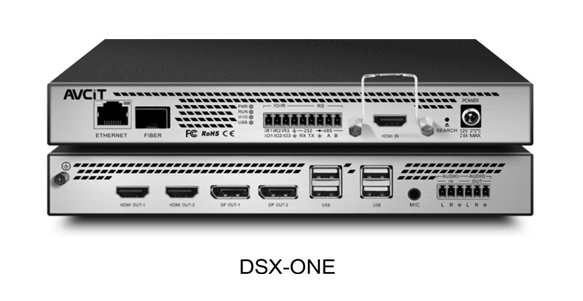
At the same time, DSX-ONE is fully compatible with all DS2 and DS3 encoder and decoder.
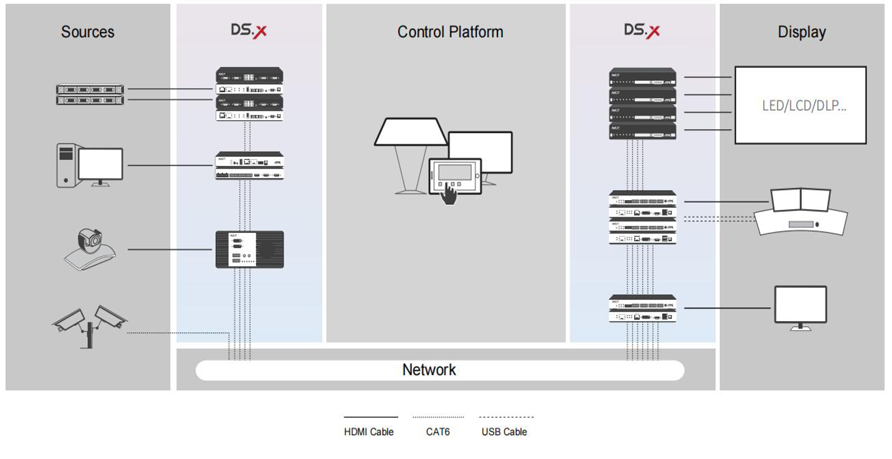
Benefiting from its no-server system architecture, it is with fully distributed and decentralized architecture, no standalone KVM server required, with greater flexibility & scalability, simplified cabling, fast installation and commissioning, whatever for intuitive video matrix switching or dynamic KVM over IP solutions, AVCIT DSX-ONE is truly all-in-one Solutions, and could add much value on your design of mission critical command & control center.
General Features
● No requirement of IGMP enabled at network switch
● No standalone KVM server required
● Transmit high quality content over 1GB network only
● Simultaneously transmit up to 50 channels high quality content over 1GB network
● POE supported, no standalone PSU required for encoder/decoder
● Redundant power supply by both PSU and POE available
● Redundant signal transmission over fiber + copper available
● Native capability to decode 3rd party RTSP steams on video wall or KVM workspace
● Encoder with HDMI loop out function to local monitor
● Patented locking kit for HDMI, compatible with most of the HDMI cable, no need dedicated HDMI connector
KVM
● No standalone KVM server required
● Preview all source real-time at OSD, what you see is what you GET
● Listing 3rd party stream on GET OSD and take over
● Power on a remote server by OSD, without 3rd party device
● Cross Display Switching features, unlimited monitor connected by one mouse + keyboard
● Mouse Support irregular layout of GPU head
● Drag/drop user experience
● Shortcut key functions: to access to a server fastly by a customizable shortcut key
● Up to 10 KVM scenario can be saved, renamed, called, rotation played
● Multi-viewing with multiple layout options to be switched seamlessly
● Access up to 16 computers/channels simultaneously, on any monitor of your workspace
● Customisable multi-view layout by OSD, up to 10 layout icons staying on OSD, free to delete & create
● Support operation by both keyboard/mouse and touch monitor
● Support accessing workstation/server with multiple-head graphic card
● Support accessing most of the OS in the market, such as Window7/8/10, Mac, Linux, etc.
● Control video wall by drag/drop on KVM OSD, 2-in-1 function OSD UI
● Up to 100 VW presets can be saved, renamed, called by KVM OSD
● A temporary user account can be created, which will be invalid once original account log in
● Login-Place Restriction for operator account, so that login can be done at only authorized KVM decoder
● Audio mixer mode: Audio from all the sources on a multi-viewing monitor will be mixed
● Audio follow mouse mode: audios on a multi-viewing monitor, auto-follow mouse
● Grounding image layer features on operator’s monitor
● Support Login by Fingerprint
Video Wall Control
● No centralized video wall processor/server required
● Built-in video wall processor for LCD and LED sending box,
● Up to 6 x 2K60(or 6 x 4K30, or 4 x4K60) PIP/POP layers per VW decoder
● Great performance of image sync for LCD display and LED sending box with irregular resolution
● Real-time preview of content on iOS/Window control tablet, what you see is what you GET
● Visualized drag/drop control by mouse & finger
● Crop part image of source or fix the source resolution ratio to display on video wall
● Free to configure any virtual video wall layout
● Annotation features by touch or pen
● Automatically video wall content duplicate/sync to other video walls
● Layout Preview-Send Mode on control tablet
● Sources manager function(signal grouping, tree chart, keyword searching)
● Integrated CCTV VMS, capture IP Camera list and decode to video wall directly
● Real-time preview of IP camera, and drag/drop to video wall
● Support ONVIF protocol to control IP PTZ Camera directly
● Rotation playing feature by control tablet
● Scheduled task to call preset based on week day and clock
● Favorite folder feature on control tablet
● Build-in audio mixer up to 16 channel
● Soft KVM features on Window OS control UI
● Grounding image layer features on video wall
● Fixed/Rolling Banner
Example of System Topology